
Tag: website

  • Why Traffic Is Dropping and What It Really Means for Your Customers

    Why Traffic Is Dropping and What It Really Means for Your Customers

    7–11 minutes

    Your website traffic is probably down. That doesn’t automatically mean your business is.

    If your Website Traffic is dropping, you’re not alone, and you probably didn’t break anything. Google now answers many questions right on the search results page, and AI tools like ChatGPT answer the rest. People get what they need without clicking, so fewer visits reach your site even when nothing on it has changed.

    This is for small business owners who opened their analytics, saw the line heading down, and felt their stomach drop with it. That reaction makes sense. For years, more traffic meant more business, and less traffic meant something was wrong. That rule doesn’t hold the way it used to.

    We’ll cover why traffic is falling, whether AI is really to blame, what you should measure instead, and what to do about it.

    Quick Take

    • Nearly 60% of Google searches now end without a click to any website.
    • When Google shows an AI summary, people click a regular search result about half as often.
    • A traffic drop is not the same as a sales drop. The visitors who still click are often closer to buying.
    • Calls, form fills, direction requests, and booked jobs tell you more than raw visit counts.
    • You can’t control how Google displays results, but you can control how clear your website, Google Business Profile, and reviews are.

    At Forward Digital Marketing, we work with small businesses across Southeast Georgia and beyond who want their marketing to bring in customers — not just create activity. When a client’s traffic dips, the first question we ask isn’t “how many visitors did we lose?” It’s “is the phone still ringing?”
    Why Is My Website Traffic Dropping?

    Most website traffic drops today come from changes in how people search, not problems with your site. Google shows answers, maps, and AI summaries at the top of the page, and AI tools answer questions directly. Searchers get what they need without clicking, so fewer visits reach your website.

    Industry research backs this up. A large study of U.S. search behavior found that about 58.5% of Google searches end without a click to any website. Someone searches “what time does the hardware store close,” sees the hours in your Google Business Profile, and drives over. That’s a win for you, but it never shows up as a Website Traffic.

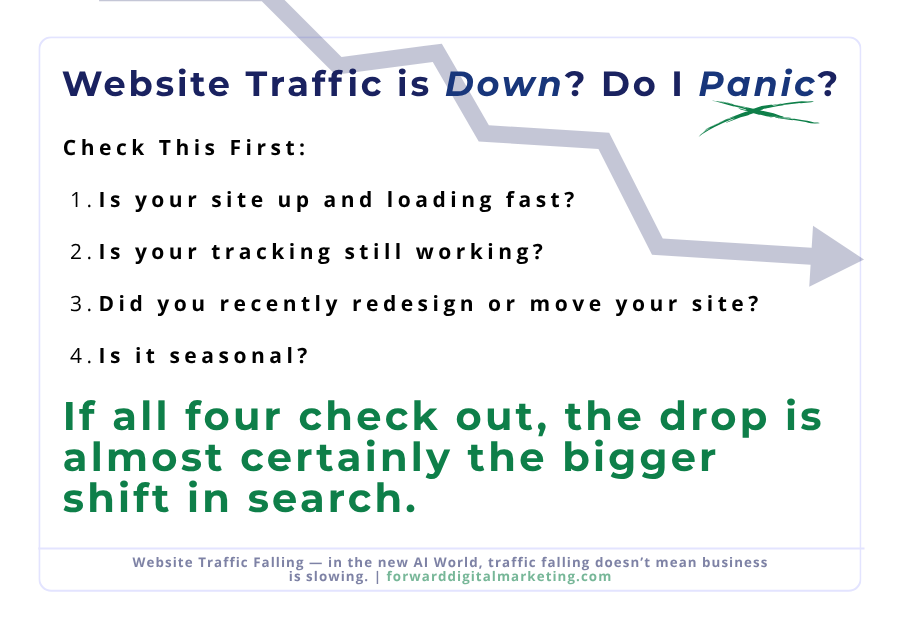
    Before you blame the search engines, rule out the problems you can actually fix. Check these first:

    • Is your site up and loading fast? A slow or broken site on mobile loses visitors before the page even appears.
    • Is your tracking still working? A plugin update, theme change, or new cookie banner can quietly break Google Analytics. Sometimes traffic didn’t drop at all. The counting did.
    • Did you recently redesign or move your site? Pages that changed addresses without redirects lose the search rankings they’d built up.
    • Is it seasonal? Compare this month to the same month last year, not to last month.

    If all four check out, the drop is almost certainly the bigger shift in search. That’s the part we’ll dig into next.

    Is AI Really Killing Website Traffic?

    AI is reducing website traffic, but unevenly. Searches for general information get hit hardest, because an AI summary can answer them completely. Searches for a local service or a business to hire still send clicks, because people need to compare, call, or book.

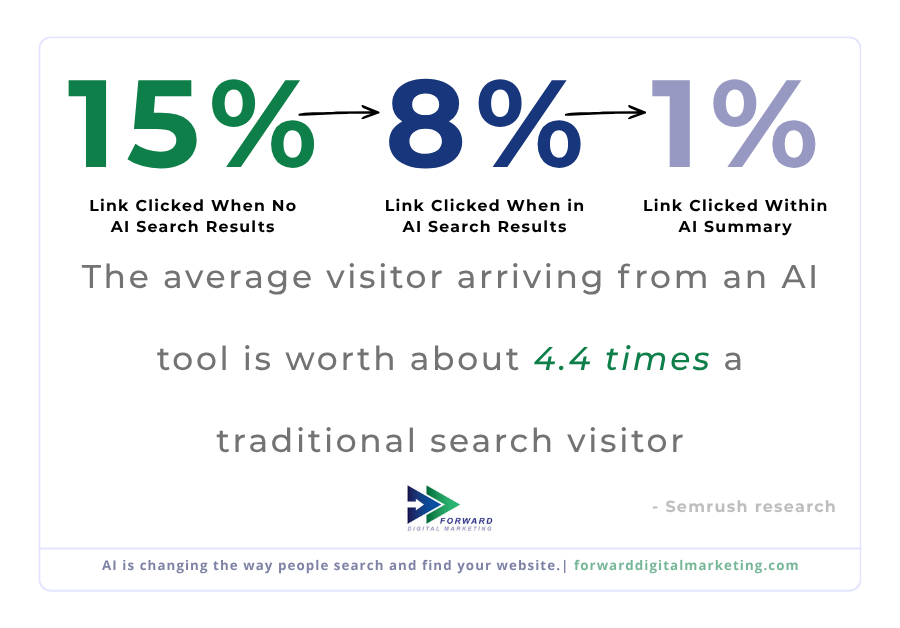
    The numbers on AI summaries are hard to ignore. Pew Research Center tracked real Google searches and found people clicked a regular result 8% of the time when an AI summary appeared, compared to 15% when one didn’t. Only 1% clicked a link inside the summary itself.

    Here’s the part that rarely makes the headlines: the people who do click are often more ready to act. Semrush research estimates the average visitor arriving from an AI tool is worth about 4.4 times a traditional search visitor, because they’ve already done their homework before they land on your site. Fewer people are browsing. More of the people who show up came to buy.

    Being the business AI tools mention also matters. Seer Interactive found brands cited inside Google’s AI summaries earned noticeably more clicks than brands that weren’t. If you haven’t looked at how to get your business into those answers, start with our guide on how to show up in AI search without paying.
    Is Website Traffic Still a Good Way to Measure Success?

    Website traffic is a useful signal, but it was never the goal. The goal is customers. For most small businesses, the better measures are phone calls, form submissions, direction requests, quote requests, and booked jobs. Those numbers tell you whether your marketing is working. Visit counts only tell you how many people stopped by.

    Think about it like a storefront on Main Street. A hundred people window-shopping and leaving is not better than twenty people walking in to buy. A lot of the traffic that’s disappearing was the window-shopping kind: people who wanted a quick answer and were never going to call you.

    Here’s what to track instead:

    • Leads per month: calls, contact forms, and quote requests combined.
    • Google Business Profile actions: calls, website clicks, and direction requests, all found in your profile’s Performance tab.
    • Conversion rate: the share of website visitors who take an action. If traffic falls but this rises, you’re doing fine.
    • Where customers say they found you: ask every new customer. It’s free and it’s the most honest data you’ll get.

    The opposite problem matters too. Additionally, if you have plenty of Website Traffic but almost no leads, the issue isn’t visibility. Moreover, it’s what happens after people arrive. Thus, that usually comes down to a homepage that doesn’t make it clear what you do. It also obscures how to reach you. Finally, we break that down in Your Homepage Has One Job.

    What This Means for Your Business

    For a local small business, less website traffic is manageable as long as the right people can still find you, trust you, and reach you. Your job is no longer to chase every possible click. It’s to make sure that when someone is ready to hire, your business is the obvious answer, whether they find you on Google, in an AI tool, or through a friend.

    For local businesses, more of that first impression now happens before anyone reaches your website. Your Google Business Profile, your reviews, and the way other sites describe you are what search engines and AI tools pull from. Parker Insurance and Realty is a real FDM client who sees fluctuations in their website visits, but they are steady with new business. Because we also manage their social media channels, we often see the influx of homes being sold without any of that up-tick in business translating to their website visits. We have seen that, because of the way we built their website, Parker Insurance and Realty shows up in AI searches.

    Your website still matters. It’s where people go to confirm you’re legitimate, check your services, and take the next step. It just needs to do that job clearly for fewer, more serious visitors. If your site is a few years old or was built in a hurry, it may be time to look at whether your website is holding your business back.

    Frequently Asked Questions

    For most websites that depend on Google search, yes. Zero-click searches and AI summaries have reduced clicks across nearly every industry. Sites that answer general questions have been hit hardest, while local service businesses tend to hold up better.

    Check Google Search Console. If your impressions are steady or rising while your clicks are falling, people are still seeing your business in search but getting their answer without clicking. That pattern points to AI summaries and zero-click results, not a problem with your site.

    There’s no universal number. A local service business can do very well with a modest number of monthly visitors if those visitors turn into calls. Compare your traffic to your own history and watch your leads. That tells you far more than any industry average.

    Usually because visitors can’t quickly tell what you do, where you do it, or how to contact you. Unclear headlines, buried phone numbers, slow mobile pages, and long contact forms all cost you leads. Fixing what’s at the top of your homepage often makes the biggest difference.

    Use Google Analytics to see visits and what people do on your site, and Google Search Console to see how often you appear in search and how often people click. Your Google Business Profile’s Performance tab shows calls, direction requests, and website clicks. All three are free.

    No, not the kind sold as “website traffic” packages. Those visits usually come from bots or people with no interest in your business, and they can skew your analytics. If you want to pay for visitors, use targeted advertising like Google Ads, where you reach people actively searching for what you offer.

    What to Do Next

    A falling traffic line is worth paying attention to, but it isn’t a verdict on your business. Search changed. The businesses that come out ahead are the ones that stop counting visits and start counting customers.

    Check the right numbers

    Pull up your leads, calls, and Google Business Profile actions for the last six months. Compare them to your traffic. You may find the business side never dropped at all.

    Strengthen your profile

    More customers meet you on Google before they ever reach your website. Make sure your Google Business Profile is complete, current, and full of recent reviews.

    Get a second set of eyes

    Not sure whether your drop is the search shift or a real problem? We’ll look at your numbers with you and tell you straight.

    Get Digital Marketing Headlines Found for YOU!

    We don’t spam! Read more in our privacy policy

  • When a DIY Website Starts Holding Your Business Back (And How to Know It’s Time to Upgrade)

    When a DIY Website Starts Holding Your Business Back (And How to Know It’s Time to Upgrade)

    4–6 minutes

    A DIY website can only take your business as far as it was built to go. What worked when you started may be what’s holding you back now.

    Many small businesses, nonprofits, and municipalities start with a DIY website for good reasons. It’s affordable, fast to launch, and puts control directly in your hands. For a while, that’s enough.

    But expectations have changed. Websites are no longer just digital brochures. They are expected to load quickly, work flawlessly on mobile devices, integrate with other systems, meet accessibility standards, and support real business goals. As your organization grows, the website that once helped you get started can quietly become a limitation.

    We see this regularly when organizations invest time into marketing, social media, or outreach but hesitate to send people to their own website. The issue is rarely effort. It’s usually that the site was never built to support what the business has become.

    Quick Take

    • DIY websites work best for early-stage or low-demand use
    • Growth changes what a website needs to do
    • Poor usability and performance reduce trust
    • A site can limit progress without visibly “breaking”
    • Even one warning sign is worth reviewing

    At Forward Digital Marketing, we help small businesses make that leap from DIY to done right — ensuring your website performs, converts, and evolves with you.

    When Does a DIY Website Stop Being Enough?

    A DIY website stops being effective when it can no longer support your current traffic, user expectations, or operational needs. If the site is slow, hard to use on mobile, or difficult to update correctly, it becomes a bottleneck. This often happens gradually, which makes it easy to overlook. The key issue isn’t the platform — it’s whether the site was designed for where your organization is now.

    Your DIY Website Was Built for a Different Stage

    Most DIY sites are created to answer a simple need: “We need to be online.”
    They are not usually designed for:

    • Higher traffic volumes
    • Multiple user types with different needs
    • Ongoing content updates
    • Long-term scalability

    As your business matures, the site often stays frozen in its original structure. Navigation becomes cluttered. Pages are added without a clear hierarchy. What once felt manageable becomes fragile and inconsistent.

    Performance and Mobile Experience Matter More Than They Used To

    User expectations have changed, especially on mobile. Slow load times, awkward layouts, and hard-to-tap buttons create friction immediately.

    Common issues we see:

    • Pages loading slowly due to bloated builders or plugins
    • Mobile layouts that technically “work” but are frustrating to use
    • Forms that are difficult to complete on smaller screens

    These issues don’t just affect user experience. They reduce engagement, trust, and search visibility.

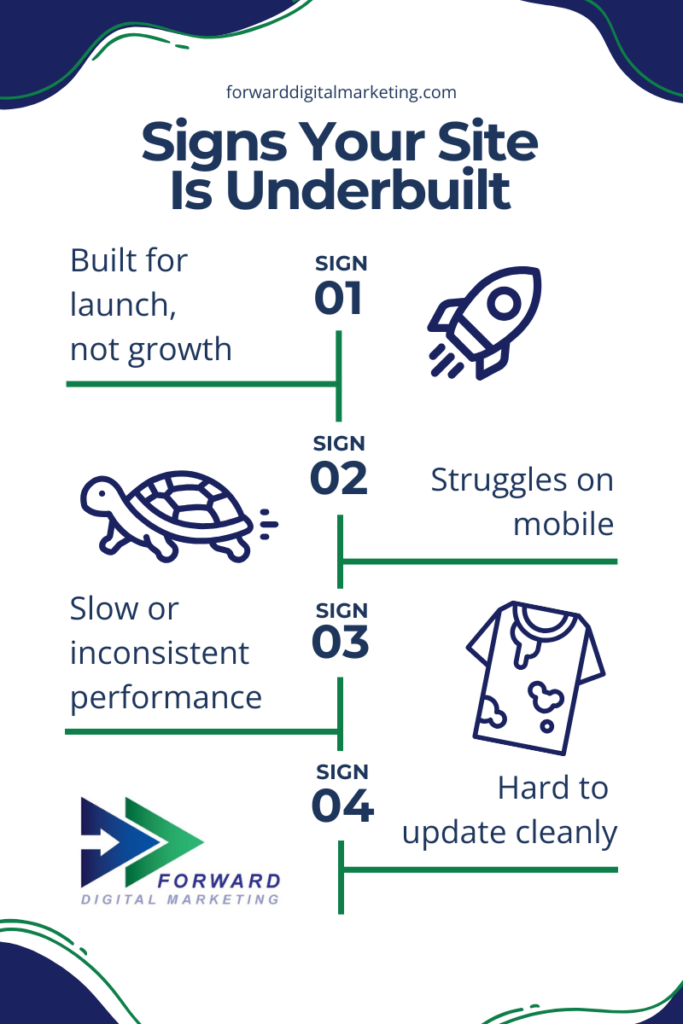
    white flyer with four signs your DIY website is underbuilt

    Your DIY Website No Longer Reflects Your Credibility

    As organizations grow, their brand expectations grow with them. A site that felt acceptable early on may now feel outdated or incomplete.

    This often shows up when:

    • You hesitate to share your website link
    • The design no longer matches your offline professionalism
    • Competitors appear more polished or easier to navigate

    Your website sets expectations before any conversation happens. When it lags behind your real-world capabilities, it creates unnecessary doubt.

    What This Means for Businesses

    A website should support your operations, not quietly work against them. When a site can’t adapt to new goals, new users, or new standards, it limits growth even if everything else is working well.

    Ignoring these signals can lead to:

    • Missed inquiries or service requests
    • Lower trust from first-time visitors
    • Wasted effort in marketing campaigns
    • Increased internal frustration managing updates

    Upgrading doesn’t always mean starting over, but it does mean reassessing structure, performance, and purpose.


    Frequently Asked Questions

    How do I know if my website is actually the problem?
    If traffic, engagement, or conversions have stalled despite other efforts, the website deserves review. Internal hesitation about sharing the site is also a strong signal. Even one clear issue is enough to investigate.

    Is a DIY website bad by default?
    No. DIY sites are useful at the right stage. Problems arise when the business grows but the site does not evolve alongside it.

    Does upgrading mean rebuilding everything from scratch?
    Not always. Sometimes the issue is structure, performance optimization, or accessibility — not the entire platform. A proper review clarifies what actually needs to change.

    What features do growing organizations typically outgrow first?
    Common gaps include mobile usability, forms and integrations, accessibility compliance, and content organization. These needs increase as traffic and expectations grow.

    How often should a website be reviewed?
    At minimum, a structural review every 1–2 years is reasonable. Major changes in services, audience, or traffic should trigger a review sooner.

    What to Do Next (Your Upgrade Path)

    At Forward Digital Marketing, we don’t treat websites as design projects alone. We treat them as systems that should support clarity, operations, and long-term growth. When a site starts to feel limiting, that’s usually a sign it’s time to step back, assess the structure, and align it with where the organization is now and where it’s going next.

    Option A: Improve What You Have

    • Speed optimization
    • Pages reorganized for conversions
    • Professional content refresh

    Option B: Migrate to a More Scalable Platform

    • WordPress benefits: ownership, customization, SEO control
    • Hosting reliability + support

    Option C: Full Redesign

    • Strategic overhaul aligned with growth goals

    Get Digital Marketing Headlines Found for YOU!

    We don’t spam! Read more in our privacy policy

  • Holiday-Ready Websites: How to Capture More Seasonal Sales (Without Rebuilding Your Site)

    Holiday-Ready Websites: How to Capture More Seasonal Sales (Without Rebuilding Your Site)

    The holiday season moves fast, and online shoppers move even faster. They’re searching for the perfect gift, comparing options, and making snap decisions. The real question is: Will your holiday-ready website convert that urgency into sales or send buyers somewhere else?

    During the holidays, attention spikes, but attention doesn’t pay the bills. Conversions do. This season isn’t just busy: it’s competitive. As shoppers search for the fastest, easiest way to buy or book before the end-of-the-year rush, small businesses that show up with clarity and confidence will win the sale. A website that makes customers wait and wonder? Those are easy to abandon. Here’s how to turn visitors into buyers, bookers, and subscribers before the busy season hits, without a full holiday-ready website redesign.

    In this article, we will:

    • Boost your holiday lead capture while customer intent is at its peak
    • Guide shoppers directly to seasonal offers where they’re most likely to click
    • Remove confusion from your buyers journey with clear CTAs and intuitive navigation
    • Build instant trust with first-time customers through social proof and up-to-date business info
    • Eliminate checkout and booking friction before it costs you sales

    Cart abandonment spikes to 70–85% during the holidays. Customers sometimes need a gentle reminder or clear motivation to complete the purchase.

    Turn Browsers Into Buyers with Seasonal Lead Capture

    During the holidays, the intention to make a purchase is high, and your website needs to meet the moment. To capitalize on that momentum, the goal is to provide time-sensitive offers or items that drive customers to stay on your site and sign up for future correspondence. Because of this, using a variety of tools is key, and employing more than one at a time is the most effective way to make the most of each visitor’s time on your site.

    Smart seasonal lead magnets for Retail:

    • Gift guides or product quizzes
    • Exclusive holiday coupons
    • Early access sign-ups
    • Downloadable buyer checklists

    Smart seasonal lead magnets for Restaurants:

    • Gift guides or product quizzes
    • Exclusive holiday coupons
    • Early access sign-ups
    • Downloadable buyer checklists

    Smart seasonal lead magnets for Service Providers:

    • Gift guides or product quizzes
    • Exclusive holiday coupons
    • Early access sign-ups
    • Downloadable buyer checklists

    Quick Wins that you can do on your site right now!

    1. Add a short “Holiday Deals” email form to your homepage
    2. Embed newsletter signup in blog content and product pages
    3. Offer promo codes in exchange for sign-ups

    Small touches, such as urgency language (e.g., “Limited Time!” or “Ends Sunday!”), dramatically boost conversions during peak shopping weeks. Placing little reminders and prompts throughout the site is a quick and easy way to capture leads, but remember to put the cues in common-sense places to avoid driving your potential customer away with annoying pop-ups or flashy pushes to capture their information. Building webpages and full websites does take finesse, and if you are feeling overwhelmed with the task, let us help!

    Serve Seasonal Offers Where Customers Are Looking

    If visitors have to hunt for holiday deals, they aren’t going to stay long. They are going to “bounce.” To help retain customers on your site, consider adding a “Holiday Hub.” This could be a temporary landing page or menu item that can be linked everywhere!

    Where to add the link?

    • Top navigation bar
    • Home hero banner
    • Pop-ups and slide-ins
    • Social + email promotions

    Then align each offer to clear audiences:

    • Under $25 stocking stuffers
    • Gifts for parents, teachers, coworkers
    • Local booking specials
    • Last-minute digital gift certificates

    Putting the right offer in the right place creates more clicks that turn into carts. Need specific industry ideas? Let’s consult, and FDM can not only audit your site to find those perfect, underutilized spaces, but also design and build your new landing page!

    Clear CTAs + Obvious Buying Paths = More Revenue

    A common conversion killer: customers don’t know the next step. If you create vague CTAs (call-to-actions), then customers are going to have to connect more dots than they want to. Time is precious to potential customers, so if they have to crawl the page to find an actionable item, chances are they are probably going to leave. As easy as it is to create seasonal landing pages to make finding the deals easy, adding buttons and links throughout your content allows customers to easily connect to you or purchase your product or service.

    Holiday CTA upgrades:

    • Replace weak text like “Learn More” with “Buy Now,” “Reserve Pickup,” or “Add to Cart“
    • Add sticky “Shop Holiday Specials” button, especially on mobile
    • Use contrasting colors for checkout paths so the stand out
    • Shorten the number of clicks to purchase (ALWAYS 3 steps or fewer)

    Even service-based small businesses should push direct action:

    • “Book by Dec 15th for guaranteed holiday installation!”

    Customers shouldn’t need to think. They should just be able to click. It not only makes the experience easier for them but also increases conversions by supporting impulse decisions and time-sensitive motivation.

    Build Trust Fast with Social Proof + Accurate Info

    New customers don’t know you yet, so trust becomes a quick deciding factor. Leverage your proof-of-work, loyal customers, and expertise to build that bridge and close the sale.

    Essential trust builders:

    • Real customer reviews
    • Photos of products and the people behind the business
    • Video testimonials (short + genuine)

    And the fastest way to boost confidence? Getting your Google Business Profile polished!

    Update your Google Business Profile

    • Holiday hours
    • Seasonal photos
    • Booking buttons
    • Updated services/products

    Staying accurate on Google = customers trust you before they click.

    Remove the Friction Before the Rush Hits

    Today’s fast-moving world finds people more impatient, and during the holiday stress, patience is even shorter. We don’t blame them! We are them. Packed schedules and holiday budgets make time even more precious, so your website needs to be at peak performance to avoid losing the customer. Use this guide to make sure your site is technically up to snuff. Below are the other journey hurdles you should be considering:

    If your site is:

    • Slow to load
    • Hard to navigate on mobile
    • Confusing at checkout
    • Missing secure payment badges
    • Lacking multiple payment options

    …holiday shoppers will leave.

    Instead of rebuilding from scratch, focus on fixing the chokepoints:
    ✅ Improve mobile usability
    ✅ Speed up load times
    ✅ Simplify forms and checkout
    ✅ Fix any broken or outdated pages
    ✅ Utilize trusted and diverse checkout methods

    Even small upgrades can protect big holiday revenue.

    Small Holiday Tweaks = Major Sales Wins

    The viewers of your site are ready to buy. That’s how they made it to you! Your website just needs to help them finish the job.

    By focusing on:

    1. Seasonal Visibility
    2. Frictionless Navigation
    3. Clear Calls to Action (CTA)
    4. Accurate Local Information
    5. and Trust-Building Elements

    You turn holiday browsers into loyal, returning customers. Before the season hits, Forward Digital Marketing can fully optimize your site.


    Want a Quick Win? Do a 15-Minute “Holiday Readiness Check”

    1
    previous arrowprevious arrow
    next arrownext arrow

    Want us to handle the changes for you?

    Let’s make sure this season is your most successful yet.

  • Wayne County Clerk of Court | Community Access Made Easy

    Wayne County Clerk of Court | Community Access Made Easy

    A Relationship Built on Trust — and a Website That Proves It

    Some clients come to us for a website. The Wayne County Clerk of Court came to us for a partner. Over a decade ago, we built their first site from the ground up. Since then we’ve grown alongside them… redesigning, modernizing, and maintaining their digital presence through six major updates as the needs of Wayne County’s citizens evolved.

    This isn’t a story about a single project. It’s a story about what happens when you build something right and never stop improving it.

    Industry: Local Government
    Services: Website Redesign, Accessibility Optimization, Hosting & Maintenance
    Partnership Length: 15 Years


    The Challenge

    A government office website has one job: help citizens find what they need quickly and without frustration. Forms, contact information, announcements, court schedules… it all needs to be immediately accessible to everyone, regardless of what device they’re using or how comfortable they are with technology.

    As digital standards evolved — mobile usability, accessibility compliance, page speed — the Clerk’s office needed a trusted partner who understood their history and could modernize without disrupting the experience residents already relied on.

    The challenge wasn’t starting over. It was knowing exactly what to keep, what to improve, and what to leave alone.

    Key areas of focus:

    • Improving readability across devices
    • Streamlining navigation to help citizens find key information faster
    • Maintaining the familiar structure trusted by residents

    The Solution

    Because we built the original site and have maintained it continuously, we knew the Clerk’s office inside and out… their content, their users, their workflow. That institutional knowledge meant no onboarding, no learning curve, and no unnecessary risk.

    Each redesign has focused on three things:

    1. Citizens first. Every navigation decision, every layout change, every content update has been made with one question in mind: can a Wayne County resident find what they need in under 60 seconds?
    2. Mobile compatibility at every stage. From desktop-first in 2013 to fully responsive today, we’ve kept the site ahead of how people actually browse — and right now that’s overwhelmingly on their phones.
    3. A backend the staff can actually use. The Clerk’s office manages their own content day to day. We built and rebuilt the backend to make that easy, even as the front end grew more sophisticated.

    The Evolution

    Technology and accessibility standards never stop evolving — and neither should your website. FDM’s long-term relationship with the Wayne County Clerk of Court shows that durability doesn’t mean stagnation; it means building a strong foundation and adapting thoughtfully over time.

    Wayne County Website Evolution
    • 2013: Original site launched by Web Electronics — simple, static, desktop-first.
    • 2017: First redesign — more images, expanded navigation, user focus.
    • 2020: Responsive design and modernization — built for how citizens actually browse.
    • 2022: UI polish and content enhancements — cleaner layout, better structure.
    • 2024: UX refinements, updated visual branding, smoother interaction.
    • Today: Continuous hosting, performance tuning, and content support by FDM.

    Coming Soon! A redesign with ADA Readiness at the center of the build.

    The Results

    Thirteen years of uninterrupted service. Zero migrations to another provider. A site that has grown with the office rather than being replaced by a stranger every few years.

    For a government office, that continuity matters. Citizens know where to go. Staff know how to manage it. And when something needs to change, there’s a team that already knows the history.

    That’s not a small thing. That’s the whole thing.

    Key outcomes include:

    • Faster load times and mobile optimization
    • Streamlined backend management for Clerk’s office staff
    • Enhanced accessibility for all citizens
    • Continued uptime and reliability built on FDM’s proven hosting and support


    Wayne County Clerk of Court Thin Banner

    Ready to Build Something That Lasts?

    Whether you’re starting from scratch or inheriting a site that needs a serious update, FDM brings the same long-term thinking to every client we work with.

    — we’ll show you exactly where your site stands and what to do next.

    We Don’t Just Build Websites

    We build lasting partnerships. Let’s chat today about any of your small business digital marketing needs! From Google Business Profiles to Email Marketing to Custom Websites, we are ready to work with you and tailor our services to your needs.

  • How Many Websites Are in the World?

    How Many Websites Are in the World?

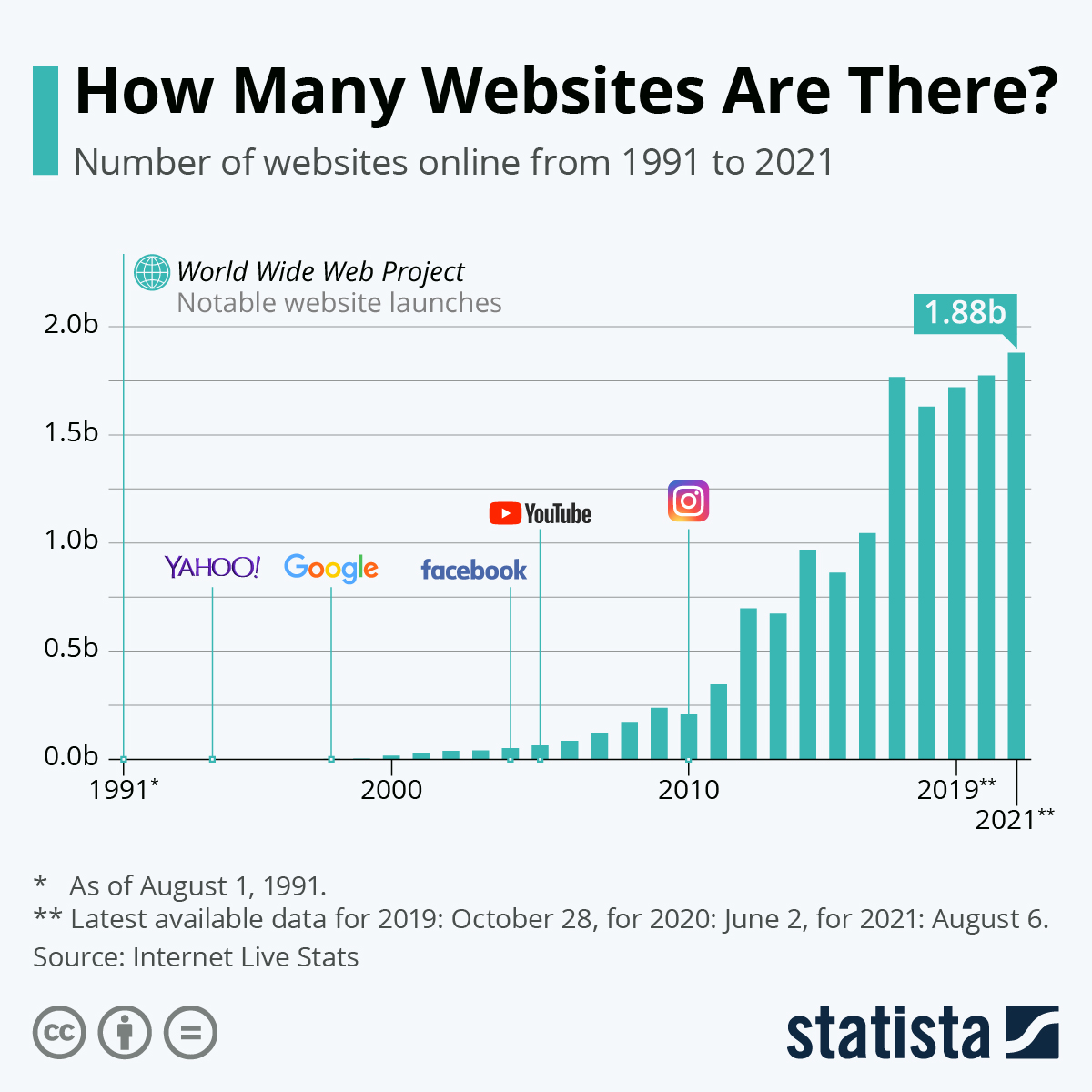
    Infographic: How Many Websites Are There? | Statista You will find more infographics at Statista

    So how many websites are in the world today? According to the Statista chart above, the number of websites in 2021 grew to 1.88 Billion! Websites are still a growing trend, so don’t get left behind and claim your domain today! Then let’s get building 😉

  • Come On In… Our Expert Team is Excited to Help Your Small Business!

    Come On In… Our Expert Team is Excited to Help Your Small Business!

    Welcome to our new website, our new look, our new approach to helping small businesses define their market and help them increase exposure for their products and services. Whether retail, real estate, services, municipalities, organizations, whatever the small business type, we help small businesses generate more leads, gain new customers, differentiated exposure, etc. with digital marketing.

    What is digital marketing? Digital marketing includes your website, email, social media presence, online listings, Internet reputation management, out of home advertising, and more. It must all be cohesive and work with any traditional marketing that you may be doing.

    As you will read, we have been in business for over 20 years, building websites and offering marketing assistance in various ways. In taking a real good look at our business recently, a business professional asked me if I had thought about changing the name. Change my name? Why would I do that? What a concept… LOL…

    Follow along if you will. We want to offer you some good tips and tricks to help your small business grow. When we find something really good from another source, we won’t keep it to ourselves. We will share with you here. One thing is certain, marketing is technology necessary. So it is always changing. Never hesitate to contact us. If you’d like to talk about your small business marketing, or you have any ideas and suggestions that you would like to share, maybe even success stories, we want to hear about them.

    If you know me, I have been signing off my emails this same way for a couple of years. Thus, the new name… We are now: Forward Digital Marketing.

    Always looking forward,

    Susan.